

Why Copilot Fails — and How to Fix It
Most people try Microsoft Copilot once, get a generic answer, and move on. The problem is not the tool — it is the approach. Copilot works best when you treat it like a collaborator, not a search box. This is why Copilot Fails.
That is why we have put together a practical one-week framework. It is not about learning AI theory. It is about organising your source material, building two core prompts, and making Copilot part of your routine in Word, Excel, PowerPoint, Outlook and Teams.
The framework is designed for people who already use Microsoft 365 and want faster results — not for AI enthusiasts. It covers selecting the right Copilot, standardising your prompts, and rolling out a repeatable process across your team.
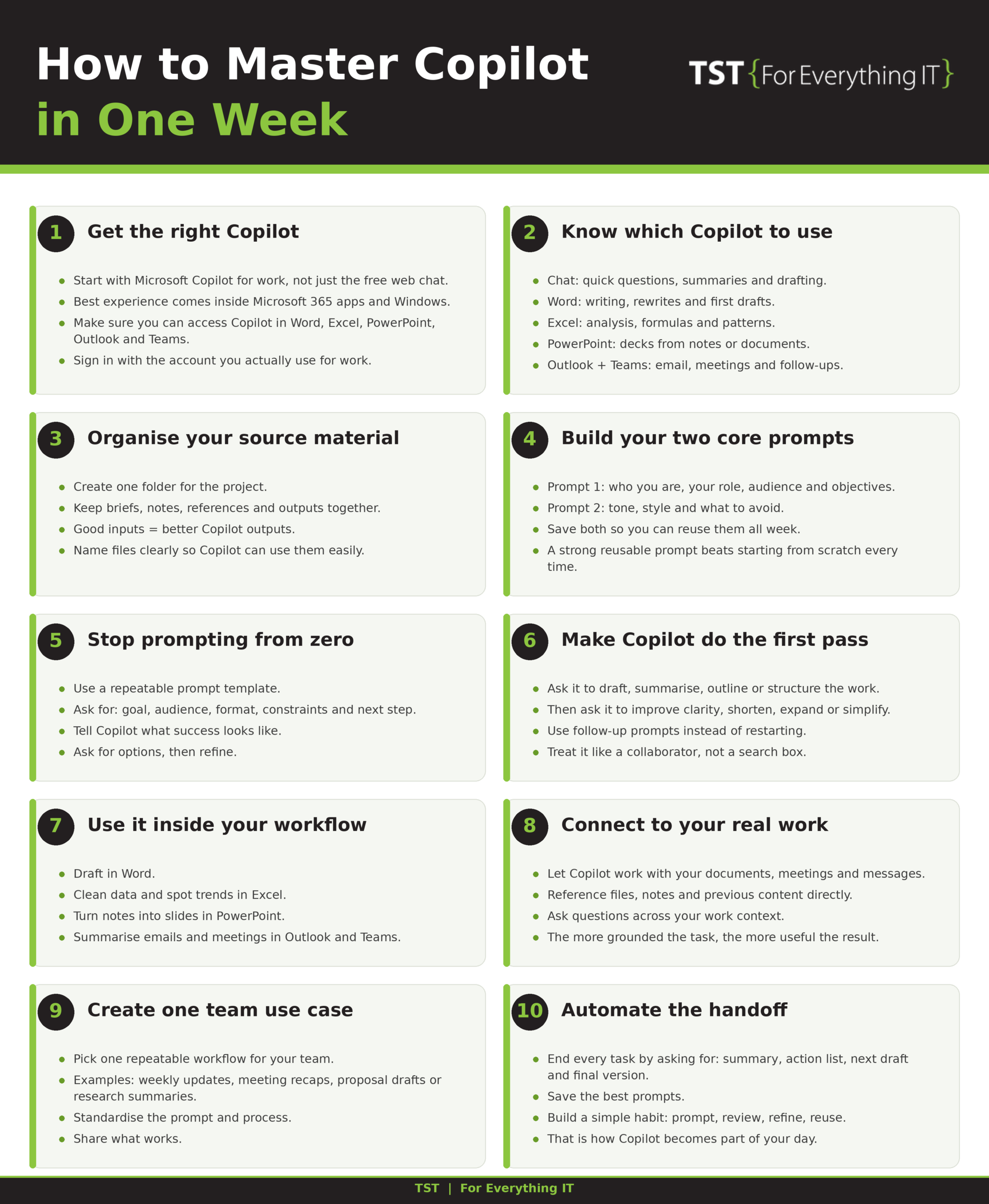
The biggest productivity gains come from standardising prompts across a team, not from individual experimentation. Pick one workflow, document the prompt, and share it. The infographic below shows exactly how.
We recommend working through one step a day. By the end of the week you will have a process you can repeat — and share with colleagues — rather than a one-off trick.
The full 10-step guide is shown in the infographic attached to this post. It includes the exact prompts, the order to follow, and the tools to use at each stage. Download it, save it, and work through it at your own pace.